
In case you haven’t noticed, here’s a heads-up: I recently added OpenSearch capability to the site.
What that means, for instance, is that if you’re using Firefox as your browser, you can add FlickFilosopher.com to your search engines, so you could search to see, say, if I’ve reviewed a certain movie without actually coming to the site. Just click on the little drop-down menu at the left side of the search engine field (yours may have Google or Bing as a default) and click “Add FlickFilosopher.com.”
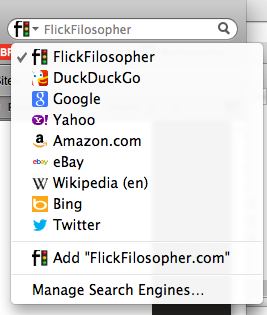
The process is likely to be similar in other browsers.
Perhaps RogerBW could elaborate on the uses of OpenSearch — he’s the one who suggested I implement this…














It’s the equivalent of bookmarking the site’s internal search engine, but without having to mess about with bookmarks. I’m using a derivative of Chrome as my main browser – if I start typing “FlickFilosopher” into the address bar, I’ll get a search box which takes me directly to the search results page, without having to load up a search form page first. Less delay and network traffic for the same result. (Particularly handy on mobile devices where bandwidth may be limited and the turn-round time for an extra page load can be quite substantial.)
In theory it’s meant to make life easier for search engine aggregators as well, but I don’t know anyone who’s using it that way.
OO, yeah!